Billing permissions control access to general invoices, pharmacy invoices and insurance claims. Invoice permissions also control whether staff can view payment records or record and reverse payments.
Where do I change billing permissions?
The clinic owner can manage all roles and users. An Admin can manage non-Admin roles and users; only the owner can change Admin permissions.
- For a role: open Settings → Permissions and select the role.
- For one person: open Human Resources, select the staff member and open Permissions.
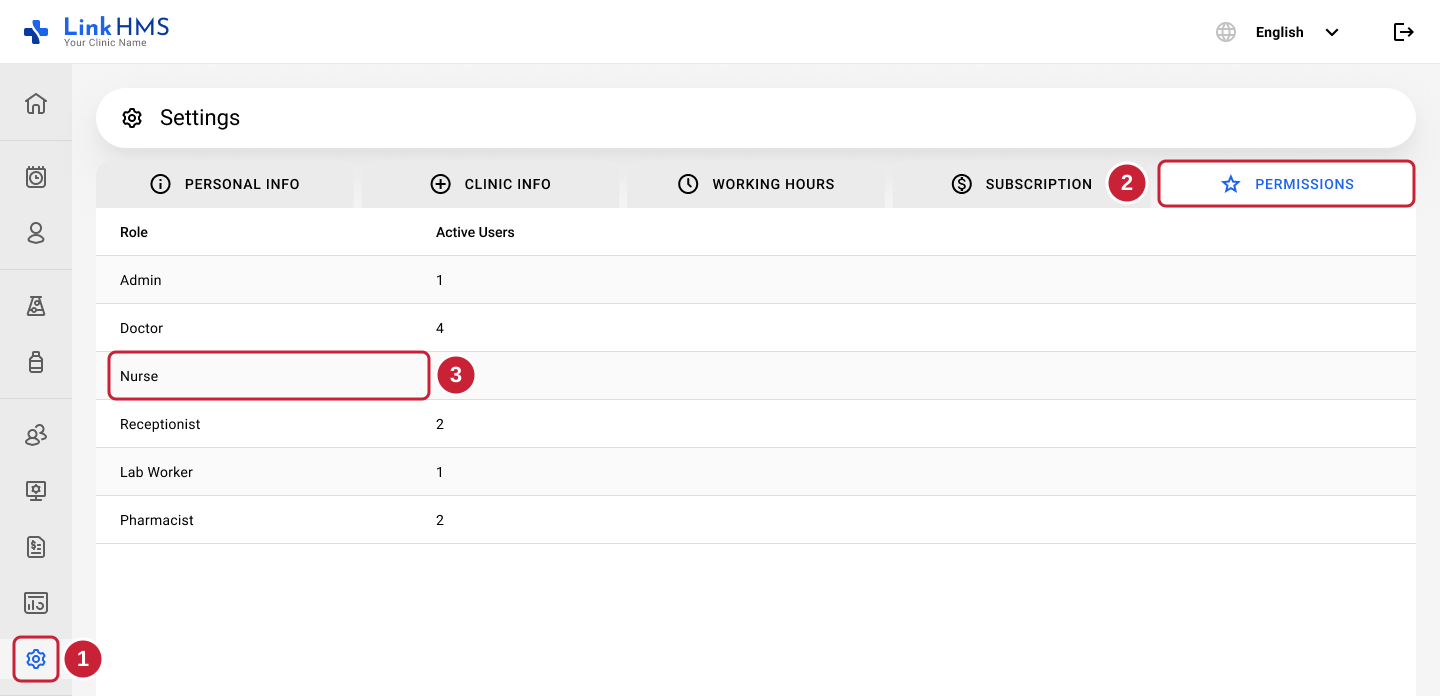
The screenshot shows the route for changing a role. On the selected role’s or user’s Permissions screen, expand Billing.
Check who will be affected: role changes apply to users who follow that role’s defaults. Users with individual permissions keep their entire separate permission set. The first individual change makes all of that user’s permissions independent of later role updates.
How do I give a user read-only access to invoices and payments?
- Choose General Billing for all invoices, or Pharmacy Billing for pharmacy invoices only.
- Enable View.
- Leave Edit off.
- Review the controls. Changes save automatically.
View access includes invoice details, the Change Log and the Payments tab. Payment information is read-only when the corresponding Edit permission is off.
How do I allow invoice changes and payment recording?
Enable the relevant Edit permission:
- General Billing → Edit allows changes to general and pharmacy invoices.
- Pharmacy Billing → Edit allows changes to pharmacy invoices only.
The relevant Edit permission covers invoice creation and editing, as well as recording and reversing payments. Enabling Edit also enables View.
There is no separate payment permission. You cannot use these settings to grant invoice editing while independently blocking payment recording or reversals.
Why is Pharmacy Billing checked and locked?
General Billing includes Pharmacy Billing.
Turning on General Billing View or Edit also turns on and locks the matching Pharmacy Billing control. To allow access to pharmacy invoices only:
- Turn off the relevant General Billing control.
- Check the matching Pharmacy Billing control: it will also have been turned off.
- Turn Pharmacy Billing back on.
- Review View and Edit together to confirm the intended access.
For example, to allow pharmacy invoice editing only, turn off General Billing Edit and View, then enable Pharmacy Billing View and Edit.
How do I control access to insurance claims?
Use Claims → View to control claims visibility. This setting covers all claim types.
Claims → Edit does not currently change access to claim creation or editing. Although the setting is shown and saved, claim actions continue to follow the user’s existing role rules. Turning it on will not grant a Doctor or Nurse new claim-writing access, and turning it off will not remove claim-writing access already provided by a role.
Invoice permissions and claims permissions are separate. Pharmacy inventory permissions also do not grant invoice or claim actions.
Why is New Invoice or New Claim & Invoice unavailable?
Creating an invoice requires Edit access for its category. Pharmacy invoice creation requires Pharmacy Billing → Edit; general invoice creation requires General Billing → Edit. Claim creation remains role-based.
LinkHMS may hide creation controls or item-selection checkboxes when the user cannot perform the relevant action.
In New Claim & Invoice, changing item coverage can require invoice or claim access the user does not have. The form displays a message and disables submission until the item selection or coverage is compatible with their access. Check the permissions and the message before changing coverage; coverage should reflect the patient’s actual insurance arrangement.
Why didn’t a role update change one user’s billing access?
Review that user’s individual permissions in Human Resources. A user with individual adjustments does not receive later role-template changes. If they should follow the role again, see how to reset permissions to the current role defaults. See How do user roles and permissions work in LinkHMS?.
Related guides
- How to manage pharmacy invoices
- How to create medication claims
- How do I control who can edit pharmacy inventory, medication prices and stock?
- How do I control who can edit services and service prices?
- How do I change an individual user’s permissions?
- Why can’t I access a module or edit information in LinkHMS?