LinkHMS separates pharmacy inventory permissions into View, Edit Medication Details, Edit Medication Price and Edit Medication Stock. This lets you give staff access to the fields they need without granting every type of inventory change.
For example, you can allow a staff member to update stock while keeping medication prices read-only.
Where do I change pharmacy inventory permissions?
The clinic owner can manage all roles and users. An Admin can manage non-Admin roles and users; only the owner can change Admin permissions.
- For a role: open Settings → Permissions and select the role.
- For one person: open Human Resources, select the staff member and open Permissions.
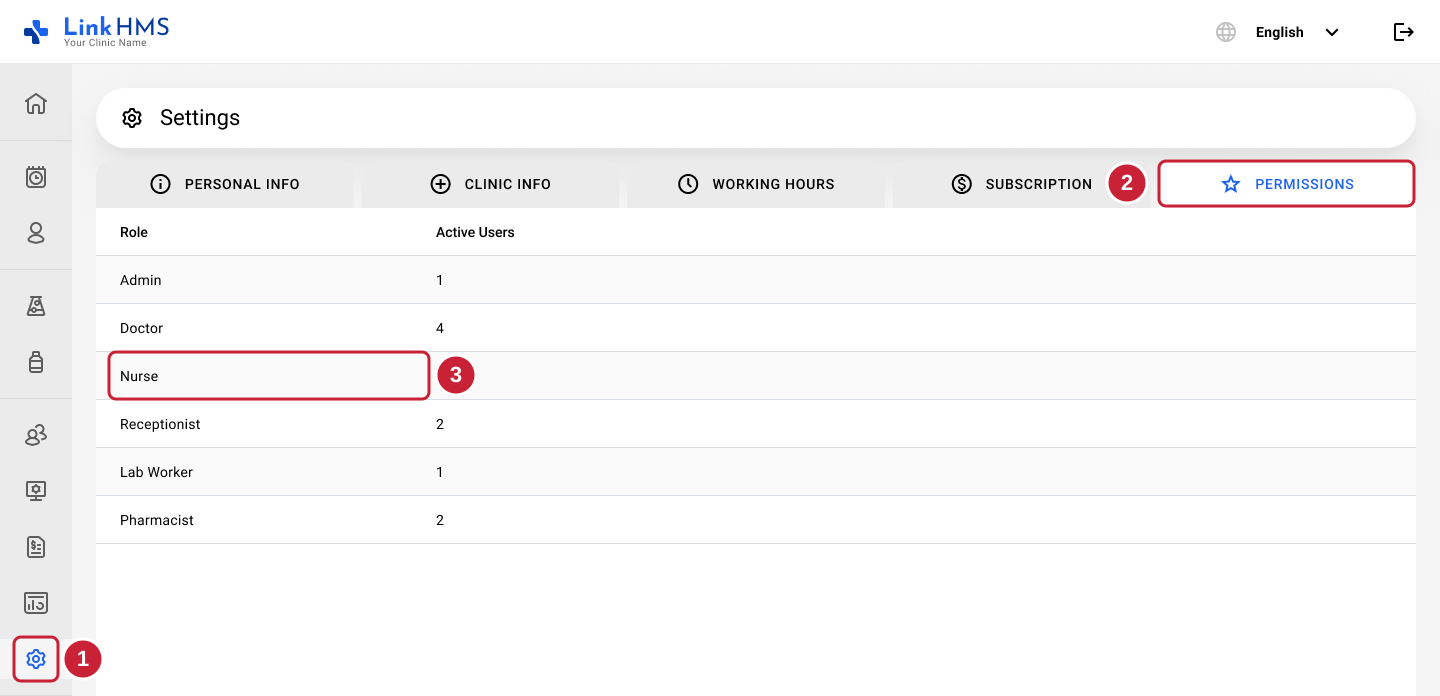
The screenshot shows the route for changing a role. Once you have opened the selected role or user, expand Pharmacy and find the Inventory controls.
Check who will be affected: role changes apply to users who follow that role’s defaults. Users with individual permissions keep their entire separate permission set. The first individual change makes all of that user’s permissions independent of later role updates.
What does each inventory permission control?
- View: reading the pharmacy inventory.
- Edit Medication Details: changing medication fields other than price and stock.
- Edit Medication Price: changing medication prices.
- Edit Medication Stock: changing stock.
The three edit controls are independent. You can enable one without enabling the other two. Price and stock changes are not included in Edit Medication Details.
How do I allow stock changes but block medication price changes?
- Open the chosen role’s or user’s Permissions screen.
- Expand Pharmacy and find Inventory.
- Enable View.
- Enable Edit Medication Stock.
- Leave Edit Medication Price off.
- Set Edit Medication Details according to whether the user should change other medication fields.
Changes save automatically. There is no Save button.
To give inventory access without allowing changes, enable View and leave all three edit controls off.
How do I allow medication price changes without allowing stock changes?
Enable View and Edit Medication Price. Leave Edit Medication Stock off. Set Edit Medication Details separately.
Review each control before finishing, particularly if you used a module-level checkbox that changes several settings at once.
Do these settings control pharmacy orders, invoices or claims?
Inventory permissions cover the medication inventory.
- Pharmacy Orders is not configurable through these permission controls; its existing role rules continue to apply.
- Pharmacy invoices and payments are controlled by Billing permissions.
- Claim creation and editing continue to follow role rules. The Claims Edit setting does not currently change access to those actions.
Giving someone permission to change medication prices does not, by itself, give them permission to create a pharmacy invoice.
Why didn’t the change affect a staff member?
Check whether they have individual permissions. If they do, follow the individual user permissions guide to update Human Resources → user → Permissions directly, or follow the Reset Permissions guide to remove all their individual adjustments and reconnect them to the role’s current defaults.
For the full explanation, see How do user roles and permissions work in LinkHMS?.