Fewer front-desk calls. Fewer missed appointments. Less time spent chasing patients for information they should already have.
LinkHMS delivers that through email: appointment reminders, test results, and invoices. Some go out on their own. Some you send with one click. Here’s the full workflow, and why it’s built this way.
Verifying the patient’s email
A test result or invoice sent to the wrong inbox is a data breach, not a typo. Verification is a one-time, thirty-second step that removes that risk permanently.
Every email through LinkHMS goes to a verified address. If an email isn’t verified yet, LinkHMS holds off on sending until it is. It’s a small extra step, but it’s the one that keeps a patient’s information going to the right place.
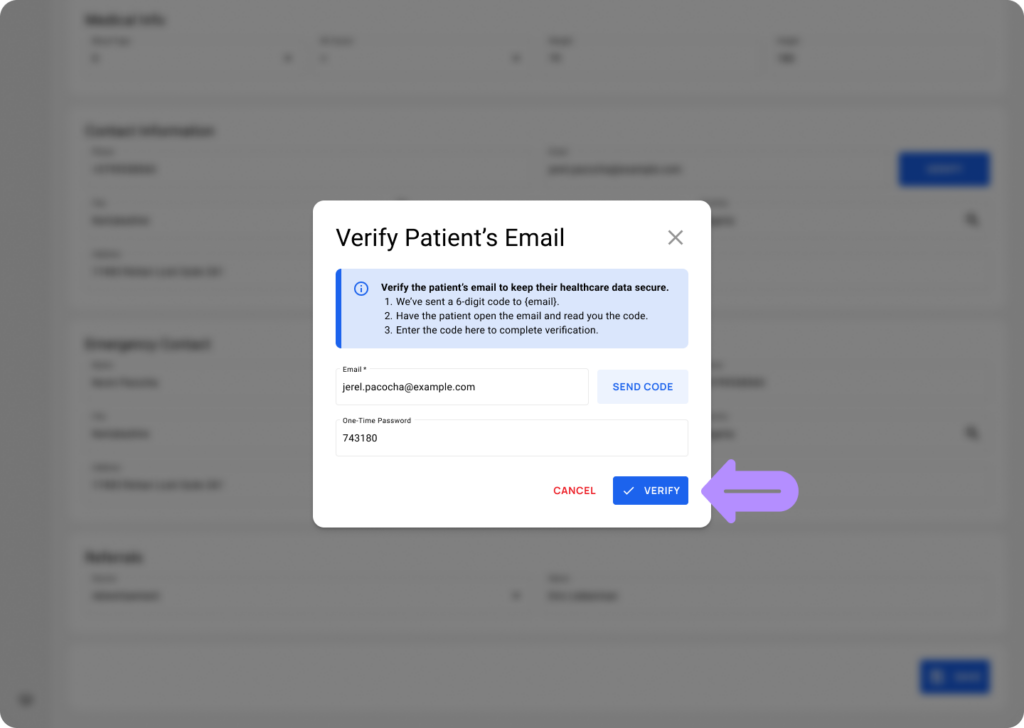
Verify the patient’s email once, and all future notifications build on it: reminders, results, invoices, and more, without you having to think about it again. For full steps, refer to the guide on How do I verify a patient’s email.
Some emails sent automatically
Once a patient’s email is verified, LinkHMS automatically sends a set of emails, with no clicks required from staff. They cover the moments patients usually call to ask about: whether an appointment is booked, when it is, and when results are in. What’s sent automatically?
- Appointment confirmed. Sent the moment you schedule the appointment. It includes the service, doctor, date, and time, so the patient has everything in writing without calling to double-check.
- Appointment reminder. Sent 24 hours before the appointment, with the same details. This cuts no-shows the most, since it catches patients who’d otherwise forget overnight.
- Test results ready. Sent the moment a lab specialist marks the test as done. It’s a notice only; the result itself isn’t attached, so patients know to check with the clinic staff for results.
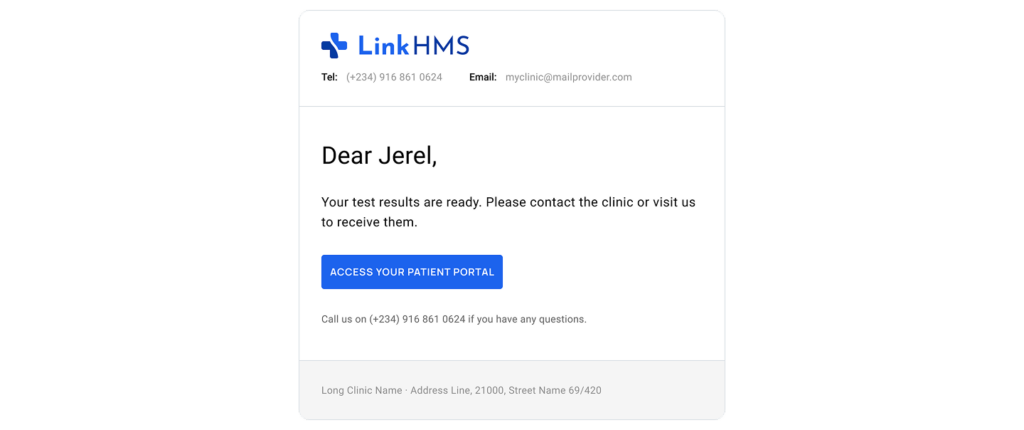
- Happy birthday greeting. Sent as a daily check, so any patient with a verified email whose birthday falls today gets one. With no clinical information included, it’s simply a friendly way to stay connected with patients.
💡Notes
If a patient’s email isn’t verified, none of these are sent, even if everything else about the appointment or result is ready. To learn when LinkHMS sends emails automatically, see Which emails do patients receive automatically.
Send documents manually, with one click
Manual send exists because not every document needs to go out the moment it’s ready, and not every patient wants it emailed at all. Some ask for a copy before they leave. Some call back later needing an invoice for insurance. Some never ask. Rather than pushing every document out automatically, LinkHMS leaves that call with staff: send it when a patient actually wants it, or the clinic decides it’s needed, whether that’s for a referral, a follow-up, or the clinic’s own records, on the spot or days later, with one click.
The actual send happens right from the patient’s records. Test results, visit summaries, discharge summaries, and invoices all follow the same basic process: once the document is ready to share, open the necessary tab and look for Send to Patient next to Print. For detailed instructions, see the guide on How do I send a document to a patient.
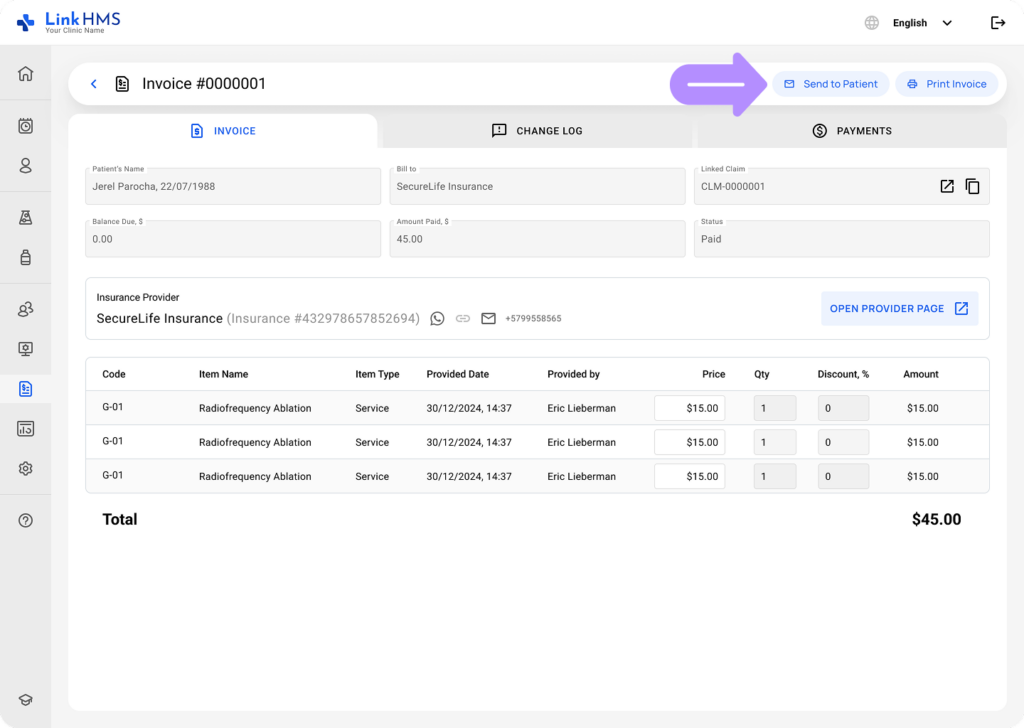 Clicking it starts with one check: the patient’s email. If the address is already verified, you simply confirm it and send. If it’s missing or not yet verified, LinkHMS takes you through email verification first and sends the document as soon as that step is complete.
The patient receives the document directly in their inbox. LinkHMS attaches the document as a PDF, using the exact same file that Print would produce with your clinic’s name, logo, and contact details. There’s no separate link to follow or download page to open. The patient gets the document itself as an email attachment.
LinkHMS handles routine communication automatically and leaves document sharing in your hands, so patients get what they need without every update becoming another front-desk task.