The Clinic Info tab contains your clinic’s general information that is used across the system and displayed on documents. It’s important to keep this information up-to-date, as it will appear on invoices and other communications.
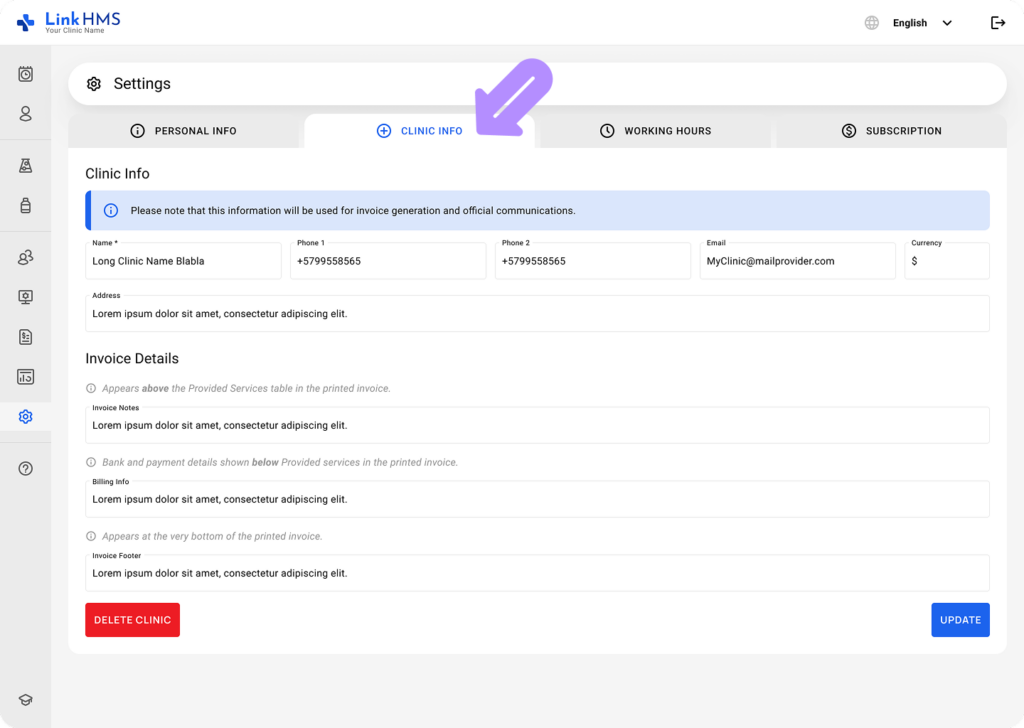
Clinic Info
-
Name: This field shows the name of your clinic as provided during registration.
-
Phone 1 / Phone 2: Add primary and secondary contact numbers.
-
Email: Enter the clinic’s official email for communication.
-
Address: Provide your clinic’s full address for accurate records.
-
Currency: Select the currency your clinic operates with (for billing and payment).
Invoice Details
- Invoice Notes: Add a short note or statement about the services or purpose of the invoices.
- Billing Info: Include payment instructions or billing-related information.
- Invoice Footer: Add a formal closing statement or financial notes.
You can refer to the additional guide for detailed instructions on how to add the invoice details to the clinic info.
💡Notes
These details are used for invoicing and official communications; please ensure they are accurate and up to date.