The antenatal pregnancy tracking module in LinkHMS is designed to help clinical teams record, monitor, and complete pregnancy care in a structured, continuous manner. Instead of spreading pregnancy-related information across multiple visits and notes, LinkHMS keeps it connected, following the patient from the start of pregnancy to its outcome.
With the pregnancy module, you can:
- Create a pregnancy record anchored to a clear clinical starting point
- Track gestational progress automatically over time
- Document antenatal checkups and ultrasound findings as the pregnancy progresses
- Attach and manage pregnancy-related files
- Finalize outcomes with a reliable, locked record
- Review a patient’s full pregnancy history when planning future care
Managing Pregnancy Care with LinkHMS
Pregnancies are handled as a long-running clinical record, similar to an admission, but with a much longer duration. A pregnancy can remain ongoing for months, during which the patient may have multiple visits or admissions, both related and unrelated to pregnancy.
💡Notes
While a pregnancy is ongoing:
- The pregnancy remains visible across visits.
- All previous records from other tabs remain accessible.
- Pregnancy-specific information stays grouped together until the pregnancy is finalized.
Accessing the Pregnancies tab
The Pregnancies tab is displayed for all patients whose gender is set to Female or Other.
What appears inside the tab depends on the patient’s pregnancy status:
- If the patient has no pregnancy records, the tab is empty and ready to start a new pregnancy.

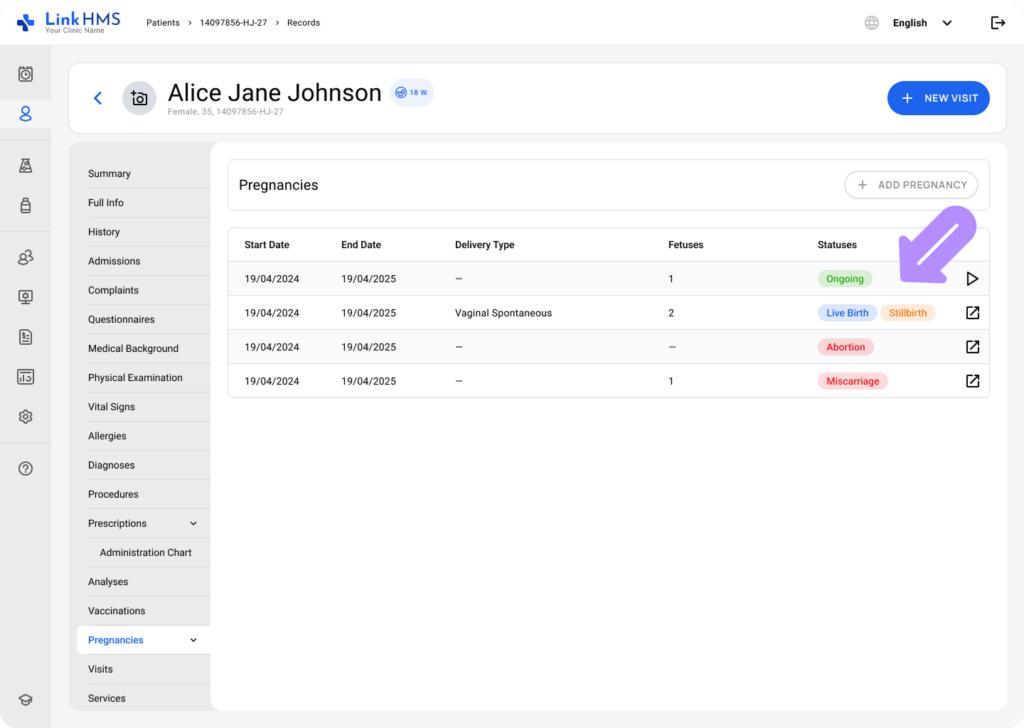
- If the patient has had previous pregnancies but none are currently ongoing, the tab displays the Pregnancy History table.

- If the patient has an ongoing pregnancy, the tab opens the pregnancy workflow with relevant subtabs.
 This ensures clinicians always land in the correct context without having to search.
Starting a pregnancy record
Pregnancy tracking begins from the Pregnancies tab. If the patient has no ongoing pregnancy, the tab displays an Add Pregnancy action.

It opens a short creation form to add the pregnancy.
💡Notes
The key requirement at this stage is the Last Menstrual Period (LMP). LMP is required because it serves as the clinical anchor for the entire pregnancy timeline. Once entered, LinkHMS immediately calculates the current gestational age and the estimated due date.

After the pregnancy is created, the record becomes active, and additional pregnancy-related sections become available automatically.
Tracking gestational age and pregnancy visibility
Once a pregnancy is ongoing, LinkHMS keeps gestational information up to date without manual entry.
To keep the pregnancy context visible across the system, a pregnancy indicator appears next to the patient’s name, showing the current gestational age. This indicator also provides quick access to pregnancy details.

💡Notes
- Gestational age is calculated from LMP and displayed in weeks and days.
- At each patient visit, gestational age is recalculated based on the visit date.
- If the pregnancy passes its estimated due date, it is visually marked as overdue.

Overview of the pregnancy workflow and subtabs
When a pregnancy is ongoing, LinkHMS automatically provides dedicated subtabs that match the natural flow of prenatal care:
- Pregnancy Info Subtab
Stores key pregnancy details and supports updates as information changes over time.

- Mother Check-Up Subtab
Used to record routine antenatal assessments in a structured, chronological format.

- Ultrasound Subtab
Supports documentation of ultrasound findings for the mother and for each fetus, including multi-fetus pregnancies, with the ability to attach related files.

- Finalize Pregnancy Subtab
Records pregnancy outcomes and completes the pregnancy record.

- Postnatal Care Subtab
Captures the care records and follow-up provided after delivery, including the mother’s recovery, baby’s EMR, postnatal visits, observations, treatments, and any complications.
 Each section builds on the previous one, allowing clinicians to document care as it progresses rather than revisiting or recreating information.
Viewing Pregnancy History
When a pregnancy is finalized, it is moved to Pregnancy History. This section provides a summary view of all recorded pregnancies for the patient, including key dates and outcomes.
Pregnancy History helps clinicians quickly understand prior pregnancy outcomes without reviewing unrelated visits or notes, making it especially valuable for follow-up care and future pregnancies.

Managing the Module Access and Permissions
LinkHMS follows role-based access controls for the pregnancy module.
- Clinical roles such as Admins, Doctors, Nurses, and Individual Practitioners can create, review, and edit pregnancy records while they are active.
- The pregnancy status indicator next to the patient name is visible to all roles, ensuring shared awareness across the care team.
The antenatal pregnancy tracking module in LinkHMS is designed to support the whole pregnancy journey in a single, connected workflow. By anchoring the record to LMP, automatically keeping gestational age up to date, and organizing documentation into focused sections, the module helps clinical teams maintain clarity, continuity, and confidence throughout prenatal care.